Romantic Moment Coloring Book
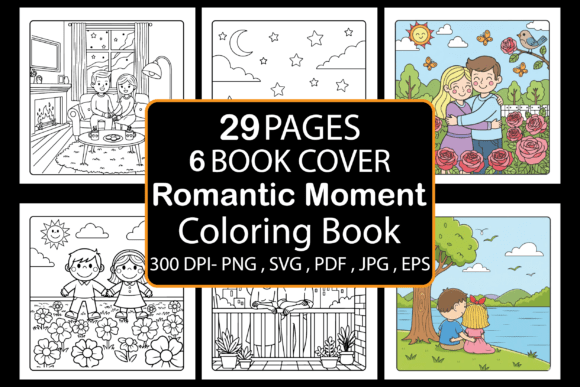
If you are involved in self-publishing, print-on-demand product creation, or digital design work, you likely know how hard it can be to source consistent, themed content that actually sells. The Romantic Moment Coloring Book is a digital printable collection of 29 hand-illustrated pages built specifically for Amazon KDP interiors, POD products, and book cover design. It is not a vague bundle of random drawings. It is a focused asset that you can drop directly into a production pipeline and see results quickly.
Whether you are an experienced KDP publisher or someone just starting to test the low-content book market, understanding what this set includes and how to integrate it into your workflow will save you hours of sourcing and editing time. This article walks you through the practical side of using this coloring book, from preparation and formatting to long-term product management.
What the Romantic Moment Coloring Book Includes
Before you decide where a resource fits in your process, you need clarity on what you are actually working with. This package is more than a simple PDF file. It contains a complete set of assets designed to reduce friction between you and a finished product.
- Interior Details: 8.5 x 8.5 inches with bleed, black and white, one final PDF file ready to upload directly to Amazon KDP.
- Format Files: 29 JPG, PNG, EPS, and SVG format files for each illustration. This matters if you want to edit, resize, or repurpose individual pages.
- Bonus Book Cover Backgrounds: 6 ready-to-use backgrounds that help you create a professional cover without hiring a designer or searching stock libraries.
Every page is built around romantic moments—couples, intimate settings, and emotional scenes—which means the theme is cohesive. For a buyer on Amazon, that consistency signals quality. For you as a creator, it means less time curating and more time producing.
Where This Coloring Book Fits in a Real Workflow
A common mistake in the low-content book space is treating every new asset as a standalone project. Instead, think of the Romantic Moment Coloring Book as a module you can plug into multiple workflows. Here are the most practical integration points.
Amazon KDP Interior Publishing
The primary use case is straightforward: take the provided PDF and upload it as your book interior. Because the file already includes bleed at 8.5 x 8.5 inches, you avoid the most common formatting headache—misaligned margins that get flagged during Amazon’s preview check. You can go from download to draft submission in under an hour if your cover is ready.
If you are running a batch publishing workflow, this set works well as a single product or as part of a series. Since the theme is romantic moments, you can pair it with complementary titles like date night journals, love-themed planners, or relationship prompt books. The key is to keep your brand consistent across products so that buyers recognize your style.
Print-on-Demand Product Creation
Beyond books, the individual PNG and JPG files are sized at 8.5 x 8.5 inches, which makes them suitable for POD merchandise like wall art, tote bags, puzzles, or pillow covers. If you sell on platforms like Amazon Merch on Demand, Redbubble, or Printful, you can use a single illustration as the centerpiece of a product. The SVG and EPS files give you vector scalability, so you can enlarge a design for a large poster or shrink it for a greeting card without losing clarity.
This is where the format variety becomes a real time-saver. Instead of manually tracing or recreating artwork, you open the vector file, adjust dimensions, and export at the exact size your POD platform requires. That direct pipeline keeps your production speed high and your error rate low.
Book Cover Design
The six included book cover backgrounds are not an afterthought. Many new publishers struggle with cover creation because they lack design skills or budget. These backgrounds give you a starting point that already matches the interior theme. You can overlay your title text, adjust contrast, and have a cover ready in a design tool like Canva or Photoshop in minutes.
If you want to create multiple variations of the same book for A/B testing different cover styles, these backgrounds allow you to swap out the main visual without reshooting or re-licensing artwork. That kind of flexibility is valuable when you are trying to optimize conversion rates on a product page.
Practical Implementation Tips
Knowing what the product contains is only half the process. The other half is execution. Here are the workflow steps that make a measurable difference in how quickly you can bring this coloring book to market.
Preparation Before Upload
Even though the PDF is ready to upload, take five minutes to run it through a quality check. Open the file and flip through each page. Confirm that the bleed margins are consistent and that no artifacts appear during rendering. If you are using the individual PNG or JPG files for POD, check the resolution at your intended print size. At 8.5 x 8.5 inches, the resolution should be at least 300 DPI to maintain print quality. The files in this set are built to that standard, but verifying prevents costly reprints.
Set Up a Consistent Naming System
When you work with 29 illustration files plus six backgrounds, file management becomes a hidden time drain. Before you start uploading or editing, rename everything using a consistent convention. For example:
- RMC_01_Interior.pdf
- RMC_01_Cover_BG.jpg
- RMC_01_Page01.png
This might seem trivial, but when you revisit a project six months later to create a sequel or update a listing, clear naming saves you from hunting through folders. It also helps if you collaborate with a designer or virtual assistant who needs to locate specific assets quickly.
Leverage the Vector Files for Customization
One advantage of receiving EPS and SVG files is the ability to edit individual elements. If you want to add a border, change a background shade, or remove a specific detail for a different market, the vector format lets you do that without rebuilding the illustration. This is particularly useful if you are adapting the same coloring book for different age groups. For adults, you might keep the lines intricate. For younger audiences, you could simplify by removing some detail in the vector editor.
Integration with Other Tools and Platforms
No resource operates in isolation. The Romantic Moment Coloring Book becomes most valuable when you connect it to the tools and platforms you already use.
KDP Previewer and Draft Submission
After you upload the interior PDF to KDP, always run the Kindle Previewer tool before hitting publish. Check that the page turns are smooth and that no text or elements are cut off. Because the file already includes bleed, you should not encounter alignment issues, but it is a step worth keeping in your standard checklist.
Design Software for Cover and Variants
If you use Canva, Adobe Illustrator, or Affinity Designer, the PNG and SVG files import cleanly without conversion issues. For Canva specifically, PNG files with transparent backgrounds let you layer the illustration over the cover backgrounds or other design elements without clipping. This keeps your workflow inside a single tool instead of jumping between multiple applications.
Project Management and Batch Publishing
If you publish multiple titles in a month, treat each coloring book as a task with a fixed set of subtasks: interior formatting, cover creation, keyword research, description writing, and submission. Using a simple spreadsheet or project management tool to track which titles are complete and which need cover updates keeps your pipeline moving. This is especially relevant when you release a series of romantic moment coloring books. Each volume can follow the same template, reducing the time per unit.
Quality Control and Consistency
One of the overlooked aspects of selling printable or low-content products is quality control. Since buyers are purchasing a PDF or printed book, any visual inconsistency reflects on your brand. Here are the specific checks I recommend before listing.
- Line thickness: Ensure the coloring lines are thick enough to print clearly. In this set, the vectors are built with standard line weights that hold up well in both digital and offset printing.
- Page numbering: Decide whether you want page numbers. If you include them, place them consistently on every spread. If you omit them, verify that no stray numbers appear from a template.
- Cover-to-interior match: Confirm that the style of the cover background matches the interior illustrations. A mismatch can confuse buyers and increase return rates.
- File size: Check that your final PDF is under KDP’s size limits. The provided PDF is optimized to stay well within those limits while maintaining print quality.
Long-Term Use and Scaling
A single coloring book can be a good entry point, but the real return comes from building a library. The Romantic Moment Coloring Book gives you a foundation you can extend in several ways.
First, you can create multiple volumes using the same theme. Romantic moments cover a broad range—candlelit dinners, beach sunsets, quiet mornings. If you release a new volume every four to six weeks, you build a catalog that cross-promotes through Amazon’s “frequently bought together” algorithm. Second, the SVG and EPS files allow you to generate derivative products like spiral-bound editions, tear-out prints, or digital downloads for tablet coloring apps. Each format opens a new distribution channel without requiring new artwork.
Over time, the assets you acquire become part of a reusable creative library. A single illustration from this set might appear in a coloring book, then on a POD mug, then as part of a printable bundle on Etsy. The more you standardize your file management and formatting process, the faster you can spin up new products from existing content.
Final Observations on the Process
The Romantic Moment Coloring Book is not a magic bullet, but it is a well-structured tool that removes the most time-consuming parts of product creation: sourcing artwork, ensuring formatting accuracy, and aligning cover and interior design. For anyone running a KDP or POD operation, the ability to skip those steps and focus on listing optimization, keyword research, and marketing is a real advantage.
If you are just entering this space, start with a single product. Use the provided PDF and one cover background to get your first listing live. Learn the submission process, gather feedback from buyers, and then apply those lessons to your next release. If you are already experienced, this set fits neatly into a batch production workflow where consistency and speed matter.
Your download delivers everything you need to move from file to market—interior PDF, 29 illustration files in four formats, and six cover backgrounds. The rest is execution. Use the assets as they are, or adapt them through the vector files to match your brand. Either way, the structural work is already done. That leaves you free to focus on what actually grows a business: getting the product in front of the right audience.